

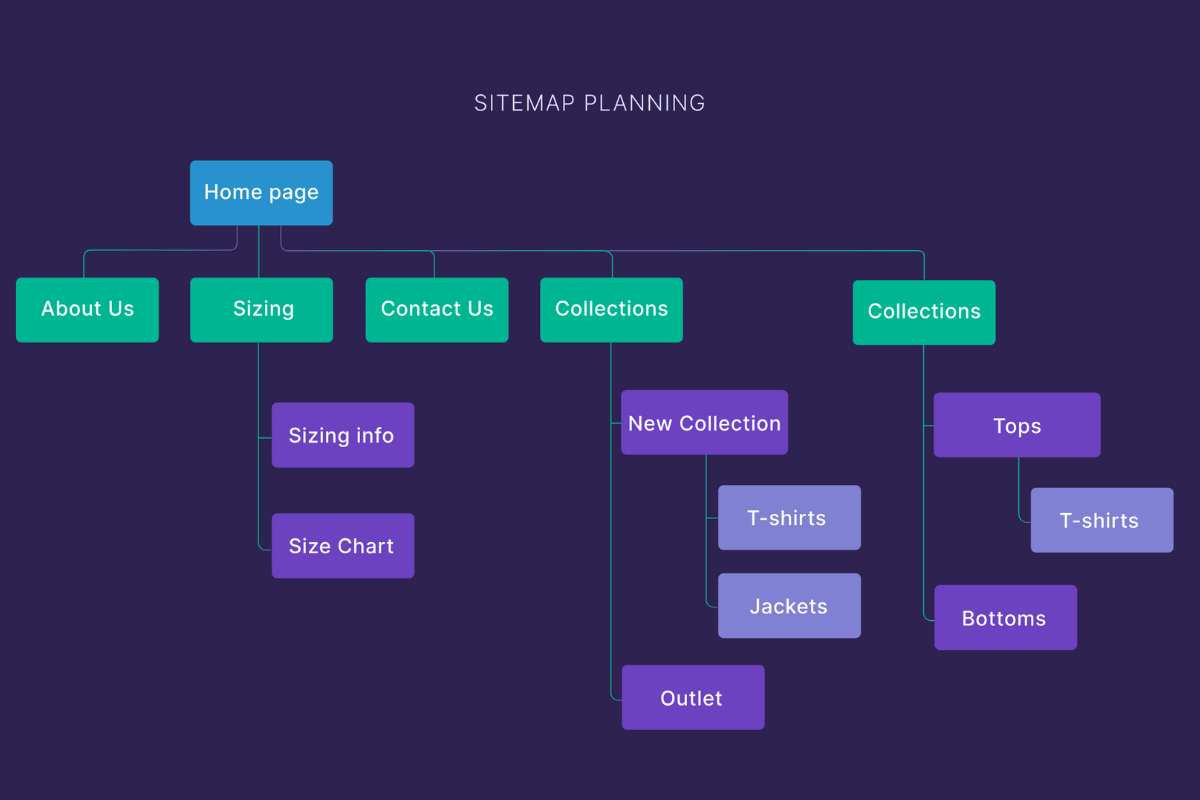
Building a website today is easier than ever, even for beginners. With the rise of drag-and-drop website builders, anyone can create a professional-looking site without touching a single line of code. Whether you are starting a blog, an online store, or a personal portfolio, the right website builder can make all the difference.
In 2025, website builders are becoming more advanced, offering AI-powered design tools, integrated SEO features, e-commerce capabilities, and responsive templates. This guide will walk you through the top website builders for beginners, their features, pricing, and best practices for choosing the right one.
Why Beginners Need Website Builders
For those new to web development, website builders offer several advantages:
- No Coding Skills Required: Drag-and-drop interfaces make designing easy.
- Pre-built Templates: Get a professional look instantly.
- All-in-One Platform: Hosting, domain, and design in one place.
- SEO Friendly: Most builders come with built-in SEO tools.
- Responsive Design: Sites automatically adjust to mobile, tablet, and desktop.
Top Website Builders for Beginners in 2025
Here’s a breakdown of the most beginner-friendly platforms in 2025:
1. Wix
Wix remains a popular choice due to its flexibility and user-friendly interface.
- Pros: Drag-and-drop editor, AI-based design, customizable templates.
- Cons: Limited scalability for large e-commerce stores.
- Pricing: Free basic plan; Premium plans range from $14 to $39/month.
2. Squarespace
Squarespace is known for its modern, visually appealing templates and all-in-one platform.
- Pros: Mobile-responsive designs, built-in analytics, blogging tools.
- Cons: Slight learning curve for complete beginners.
- Pricing: $16–$49/month.
3. WordPress.com
Ideal for beginners who want flexibility and scalability.
- Pros: Thousands of themes and plugins, blogging capabilities, SEO-friendly.
- Cons: Slightly technical compared to pure drag-and-drop builders.
- Pricing: Free basic plan; Paid plans $5–$45/month.
4. Weebly
Weebly is perfect for small businesses and personal projects.
- Pros: Drag-and-drop, e-commerce features, responsive templates.
- Cons: Less design flexibility than Wix or Squarespace.
- Pricing: Free plan available; Paid plans $6–$26/month.
5. Shopify (for E-commerce beginners)
Shopify is best for those focusing on online stores.
- Pros: Integrated payment gateways, inventory management, SEO tools.
- Cons: Transaction fees on some plans.
- Pricing: $29–$299/month.
6. Zyro
Zyro is an AI-driven website builder designed for simplicity.
- Pros: Fast setup, AI content tools, affordable pricing.
- Cons: Limited advanced customization.
- Pricing: $2.90–$14.90/month.
Features to Look for in a Website Builder
When choosing a website builder, consider these essential features:
- Ease of Use: Intuitive drag-and-drop editors.
- Templates: Modern and mobile-responsive designs.
- SEO Tools: On-page SEO options like meta tags, sitemaps, and alt texts.
- E-commerce Capabilities: For selling products online.
- Customer Support: 24/7 support for troubleshooting.
- Scalability: Ability to expand your website as your business grows.
Summary Table: How Website Builders Impact SEO Rankings
| Factor | Role in SEO | Builder Impact | Best Practice |
|---|---|---|---|
| Website Speed (Loading Time) | Google ranks faster websites higher | Slow website builder = poor rankings | Choose builders with optimized templates & hosting |
| Mobile Responsiveness | Mobile-first indexing by Google | Non-responsive templates hurt rankings | Use mobile-optimized templates |
| SEO Tools & Plugins | Helps rank higher in search engines | Limited SEO tools = less traffic | Pick builders with built-in SEO tools |
| Security (SSL, HTTPS) | HTTPS is a ranking factor | Weak security = lower trust and ranking | Use builders with SSL included |
| Custom URL Structure | Helps search engines crawl pages | Poor URL management = indexing issues | Use builders allowing custom URLs |
| Content Management | Fresh content boosts SEO | Limited CMS options = hard to update content | Choose builders with easy CMS features |
| Site Architecture | Good navigation improves ranking | Confusing menus = high bounce rate | Use clear, hierarchical site structure |
| Integration with Analytics | Tracks user behavior & improves SEO | No analytics = poor insights | Integrate Google Analytics |
| Page Indexing & Sitemap | Helps Google discover pages | Builders with poor sitemap options = slow indexing | Use auto-generated sitemaps |
| Performance & Reliability | Stable, fast-loading sites improve SEO | Frequent downtime = bad SEO | Pick reliable hosting or builders |
Pricing List of Top Website Builders in 2025
| Website Builder | Basic Plan | Premium Plan | Special Notes |
|---|---|---|---|
| Wix | Free | $14–$39/month | Includes hosting & templates |
| Squarespace | $16/month | $49/month | Includes analytics & e-commerce |
| WordPress.com | Free | $5–$45/month | Thousands of themes & plugins |
| Weebly | Free | $6–$26/month | Good for small businesses |
| Shopify | $29/month | $299/month | Best for online stores |
| Zyro | $2.90/month | $14.90/month | AI-driven tools & affordable |
Tips for Beginners When Choosing a Website Builder
- Define Your Goal: Decide if your website is for blogging, business, or e-commerce.
- Test Free Plans: Start with free plans to get a feel for the builder.
- Check Templates: Ensure they are modern, mobile-friendly, and customizable.
- Consider SEO Features: Built-in SEO tools are crucial for rankings.
- Look at Pricing: Compare features vs. cost to get the best value.
- Read Reviews: User experiences can reveal hidden pros and cons.
- Support & Tutorials: Opt for builders with good customer support and tutorials.
Conclusion
Choosing the right website builder is the first step to building a successful online presence in 2025. Platforms like Wix, Squarespace, WordPress, Weebly, Shopify, and Zyro make it easy for beginners to design, launch, and manage websites without technical expertise. Pay attention to SEO tools, speed, responsiveness, and pricing to ensure your site performs well and grows over time.
Start today and bring your ideas online with ease!
